After-hours inquiries
Keep the first conversation moving when your sales team is busy or the dealership is closed. Answer initial questions and collect the details your team needs to follow up.
ASTERHOP Dealer Assistant
Turn dealership website conversations into qualified leads and booked test drives.
Help website visitors get a timely reply, ask vehicle questions, explore inventory, arrange a test drive, and share the information your sales team needs for follow-up.
Public demo uses fictional inventory and demo bookings. Production integrations are scoped during pilot.
From the first question to the next step
See the sales workflows demonstrated today. A dealership pilot defines how they fit your real data, team, and processes.
Keep the first conversation moving when your sales team is busy or the dealership is closed. Answer initial questions and collect the details your team needs to follow up.
Help shoppers explore vehicles, ask about listed availability, and narrow their interests using the inventory information supplied to the assistant. The public demo uses sample inventory; live inventory access is scoped during pilot.
Answer questions about a selected vehicle’s equipment, drivetrain, seating, and other supplied specifications. Missing details stay unknown. Dealership staff confirm final availability, equipment, pricing, financing, and trade-in values.
Move from vehicle interest to a selected time and a test-drive booking in the demo calendar. The public demo books fictional appointments only. Real scheduling rules and calendar connections are scoped during pilot.
Collect a shopper’s name, email or phone, vehicle interest, preferred visit time, purchase timeline, and trade-in interest when provided. Prepare a conversation summary and next step for a salesperson.
Review captured interests and follow-up information in the demo Sales Lead Inbox, alongside scheduled demo visits in the Sales Calendar. Both show only the current private demo session; they are not a connected production CRM.
How it works
A helpful answer becomes a clear next step. Follow the journey from a website question to a salesperson’s follow-up.
A shopper asks about a vehicle, inventory, or a test drive in a website conversation.
Use supplied vehicle details to answer the question and clarify interest. The illustration uses sample inventory; missing specifications stay unknown.
The visitor selects a sample slot and supplies fictional contact details. The demo records a fictional booking; real scheduling rules are scoped during pilot.
Vehicle interest, visit timing, contact information, and conversation context come together in the demo Sales Lead Inbox.
The demo organizes the lead and booking in its Inbox and Calendar. Production delivery to your team is scoped during pilot. Your salesperson remains in control of the sale.
Illustrative workflow · Sample inventory, fictional bookings, human follow-up.
Inside the demo
The Sales Lead Inbox and Calendar demonstrate the handoff from inquiry to follow-up. These are actual demo interface screenshots with fictional data and illustrative metrics; Northline Motors is a fictional dealership, not an ASTERHOP customer.
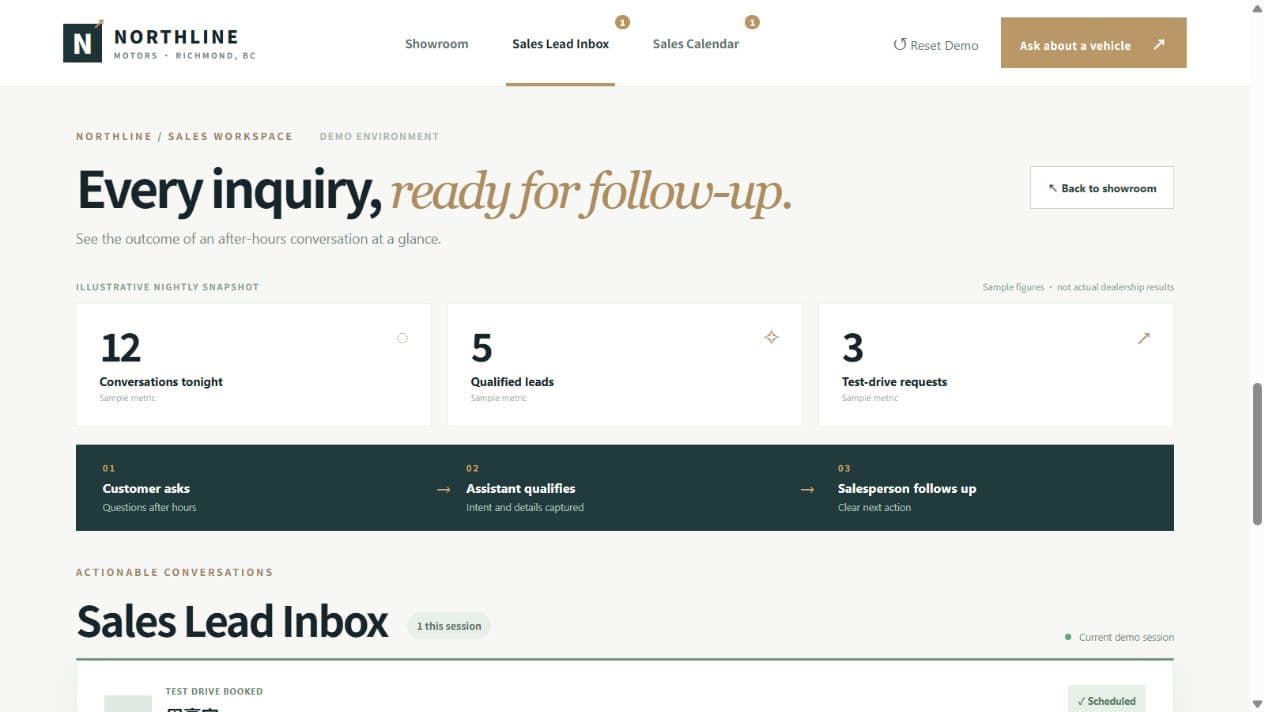
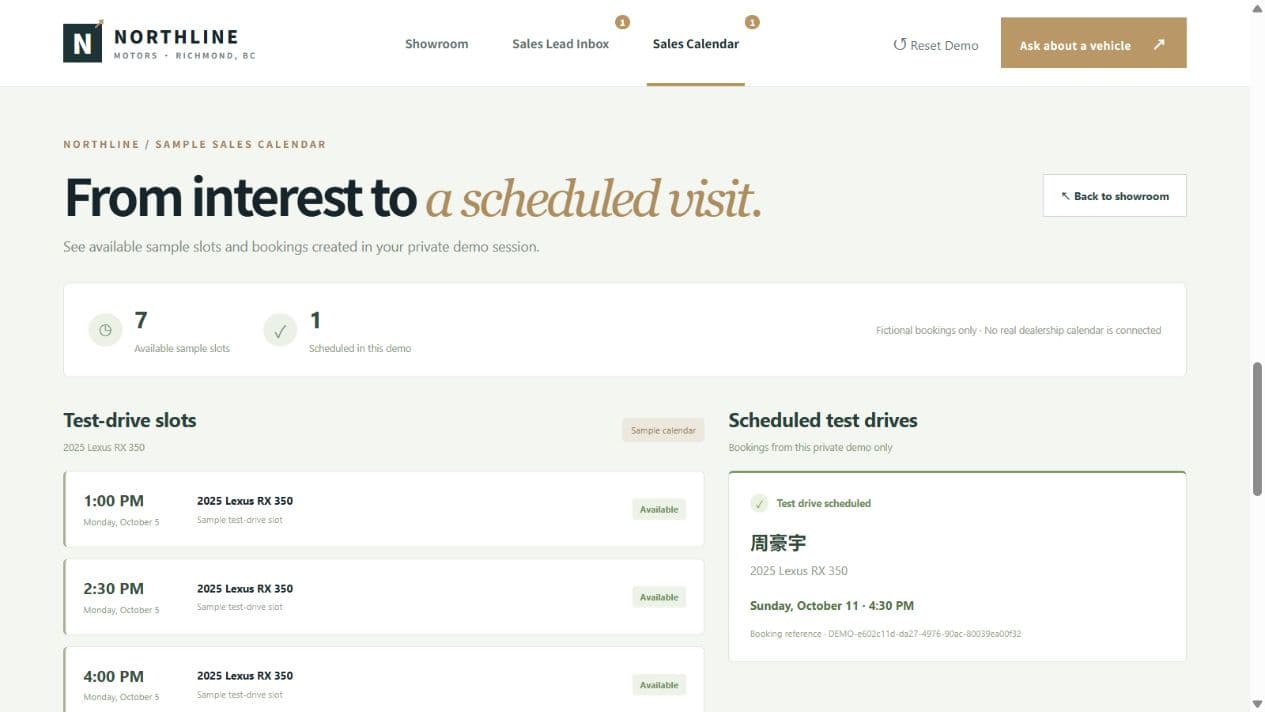
Demo leads and appointments are temporary, session-specific examples. Use fictional personal information when trying the demo.
FAQ
What the demo does today, and what we scope together for a dealership pilot.
ASTERHOP Dealer Assistant handles initial sales inquiries, inventory questions, vehicle-specific questions based on supplied information, test-drive interest, and sales follow-up details. The public demo shows these workflows using fictional vehicles and sample appointment slots. Details outside the supplied information need confirmation from dealership staff.
The assistant can handle initial website inquiries without waiting for a salesperson, including after-hours inquiries when the service is available. Pilot availability and handoff arrangements are agreed with the dealership. The public demo has usage limits and may be temporarily unavailable; it is not a production uptime guarantee.
Yes. The demo can keep track of a shopper’s selected vehicle and answer from its supplied specifications, including equipment and drivetrain details. Its inventory is fictional and is not verified against real VINs. Unknown specifications are identified rather than invented.
Yes, in the demo a shopper can select a sample slot and provide a name plus an email or valid phone number to book a fictional test drive. The booking appears in the demo Inbox and Calendar. No real dealership calendar is connected; production scheduling and confirmation rules are scoped during pilot.
The demo captures information the shopper provides, such as name, email or phone, interested vehicle, visit timing, purchase timeline, and trade-in interest, with a summary for follow-up. Demo data is temporary and held in the private browser session’s server memory; it is not delivered to a real sales team or CRM. Please use fictional contact details in the demo. Data handling and handoff requirements are scoped during pilot.
No. It supports the initial conversation and organizes information for human follow-up. Sales staff remain responsible for confirming vehicle details, availability, pricing, finance terms, trade-in values, appointments, and the sale.
The current public demo uses sample, fictional inventory supplied to the assistant. It has no real dealer production integration. A pilot scopes the inventory source, field coverage, refresh process, availability checks, and the questions that should be handed to staff before any live dealership rollout.
CRM, calendar, and inventory production integrations are scoped during pilot. The current public demo has no real dealer production integration, and ASTERHOP does not claim support for every CRM or DMS. Contact us to review your systems and agree on a feasible pilot scope.
Start with a defined pilot
Tell us about your website, inventory source, sales workflow, and scheduling needs. Together we can scope a pilot, including CRM, calendar, and inventory production integrations.